How To Setup A Reusable Framework For Your Next Website

You’ve done your research, sketched out the wireframes, designed a stunning mockup and now its time to markup. Where do you start?

Having your own reusable framework is a great way to save time and provide a basis for your next website.

Your own reusable framework is by no means perfect for every project that you work on but it is a great starting point and it can evolve over time.

This post looks at the current framework I have in place and breaks it down. Please feel free to reuse this as you see fit and also point out anything that you feel would be beneficial to add (or remove).

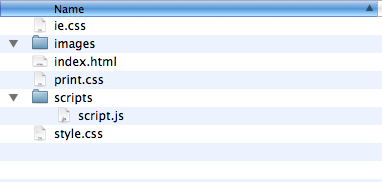
Framework structure
Picture 3.png

All files are kept in a folder simply named ‘NewSite‘ which contains the following:

ie.css
A stylesheet specific for IE6 (or sometimes 7) that at the end of a project will usually contain various CSS bug fixes and PNG transparency fixes.

images/ directory
For storing all images for the website.

index.html
The main template for the website. Depending on CMS or programming language I use this will be chopped up at some stage.

print.css
A stylesheet used when printing a document.

scripts/ directory
For placing all the project’s Javascript files.

script.js
A default script for placing most of the project’s Javascript code, stored in the scripts directory.

style.css
The main stylesheet.

Now lets look at what each file contains.

index.html

This is the main template for any website and the starting point for marking up.

<!doctype html>
<html lang="en">
<head>
	<meta charset="utf-8">
	<meta name="description" content="">
	<meta name="keywords" content="">
	
	<link rel="icon" type="image/x-icon" href="/favicon.ico" />
	
	<link rel="stylesheet" type="text/css" href="style.css" media="screen" />
	<link rel="stylesheet" type="text/css" href="print.css" media="print" />
	
	<!--[if lt IE 7]>
	<link rel="stylesheet" href="ie.css" type="text/css" />
	<![endif]-->
	
<!-- 	<script type="text/javascript" src="http://ajax.googleapis.com/ajax/libs/jquery/1.3.2/jquery.min.js"></script> -->
	<script type="text/javascript" src="scripts/script.js"></script>
	
	<title></title>
</head>

<body>

<p id="skipto"><a href="#main">Skip to content</a></p>

<div id="header" class="group">
	<div id="logo"><a href="/"><span></span></a></div>
	<ul id="nav">
		<li class="selected"><a href=""></a></li>
		<li><a href=""></a></li>
		<li><a href=""></a></li>
		<li><a href=""></a></li>
	</ul>
</div>

<div id="content" class="group">
	<div id="main" class="main">
	
	</div>
	
	<div class="sidebar">
	
	</div>
</div>

<div id="footer">
<p>Copyright &copy;</p>
</div>

</body>
</html>

Notes about the markup used:

styles.css

Now lets look at the default stylesheet I’m using.

/*
Author: Lee Munroe
*/


/* 
# CSS contents ###################
* 1 Reset defaults
* 2 Layout
* 3 Nav
* 4 Headings
* 5 Lists
* 6 Images
* 7 Links
* 8 Forms
* 9 Tables
* 10 Typography 
* 11 Other
*/


/* 
# Colour reference ###################


*/
 
/*
# Reset defaults ################### 
*/

html, body, div, h1, h2, h3, h4, h5, h6, ul, ol, dl, li, dt, dd, p, blockquote, pre, form, fieldset, table, th, td { margin: 0; padding: 0; } 
a:link, a:visited{text-decoration:none;outline:none;}
html {overflow: -moz-scrollbars-vertical;}
#skipto{position:absolute;left:-9999px;top:-9999px;}
.group:after {content: ".";display: block;height: 0;clear: both;visibility: hidden;}

/*
# Layout ################### 
*/

body{font:75%/1.5  "Helvetica Neue", Helvetica, Arial, sans-serif;color:#222;background:#fff;}

/*
# Nav ################### 
*/


/*
# Headings ################### 
*/

h1{}

h2{}

h3{}

h4{}

#logo{width:;height:;background:url(images/logo.gif) no-repeat;}
#logo a{display:block;height:100%;width:100%;}
#logo a span{position:absolute;left:-9999px;top:-9999px;}

/*
# Lists ################### 
*/


/*
# Images ################### 
*/

img{border:none;}
img.left{margin:0 10px 10px 0;}
img.right{margin:0 0 10px 10px;}

/*
# Links ################### 
*/

a{}
a:hover{}

/*
# Forms ################### 
*/


/*
# Tables ################### 
*/


/*
# Typography ################### 
*/

p{margin:0 0 1.5em;}

/*
# Other ################### 
*/

.right{float:right;}
.left{float:left;}
.clear{clear:both;}
.alignleft{text-align: left;}
.alignright{text-align: right;}
.aligncenter{text-align: center;}

Notes for the stylesheet:

ie.css

.group {zoom: 1;}

Notes:

print.css

#header, #footer{display:none;}

Notes:

script.js

/*
$(document).ready(function() {
	
});
*/

Notes:

Conclusion

Download framework as zip file

Please feel free to use these templates in your own projects.

Again, this is just a framework I’ve put together over time. I recommend you adapt it to suit your own environment.

What does your framework look like? Anything useful I’ve missed?

Further reading

More useful templates/frameworks to check out:

Related articles


60 Appreciated Comments

  1. On the , Thomas Craig Consulting said:

    Nice post, only thing I’d change is putting my styles in there own folder as well.

  2. On the , v-render said:

    cool framework. simple n sleek ..
    Thanks

  3. On the , Nathan Staines said:

    It’s always interesting to see the framework that other designers build from, seems to me like you have all the bases covered.

    Great post, and I’m loving the new design ;)

  4. On the , Bruno said:

    Thanks a lot for sharing, I’m looking for something like that for a while! :o)

  5. On the , Greg said:

    Only thing I’m not sure about is the use of HTML5 doctype while not using HTML5 tags like . If it’s not going to be fully HTML5, is there a good reason to not stick to earlier doctypes? Or on the flip, if it’s doctype HTML5, why not use those elements?

  6. On the , Mathias Bynens said:

    Since you’re using the HTML5 doctype, why aren’t you omitting the type attribute on link and script elements?

    Also, why use a separate print stylesheet (rather than simply using a media query in style.css)?

    What’s the point of something like &lt;div id=&quot;main&quot; class=&quot;main&quot;&gt;? In most cases, it seems to me you won’t need that much markup at all. Why include it in your website framework if it’s only needed like 0.01% of the time?

    In script.js, why not use $(function() { }); instead of $(document).ready(function() { });? It’s shorter, easier to remember and does exactly the same.

  7. On the , Josue Abreu said:

    Thank you! I’ve been curious for some time about what kind of default structure you had for your websites :)

  8. On the , Mark McCorkell said:

    Lovely clean framework structure there, Lee. I looked through your site code before and remarked how well structured your CSS is in particular.

    I know (shamefully) I don’t write my CSS as organised as I should, because it’s usually just going to be me looking through it to find things. Probably similar logic to ‘my bedroom isn’t a mess because I know where everything is’! :-) But I am going to start to use a proper framework though to make my life easier writing stuff, and yours is probably one of the neatest I’ve read, with Yaili being the only other of the same level of tidiness!

    One main thing I see you do quite different is that you write your CSS on single lines – I find that harder to read, so that’s probably the only adjustment I’d make to that stylesheet framework, but other than that it’s perfect for moi!

  9. On the , jkulak said:

    Neat framework for basic websites! I’ll grab CSS for my default Zend applications. Thanks!

  10. On the , Tommy Brunn said:

    Seems very useful. The only changes that I’ve made, other than putting all the css files in their own directory, is to use the new header, nav and footer elements, as proposed by the HTML5 specification draft.

  11. On the , Gareth Watson said:

    Great post Lee. It’s insightful to see your take on development frameworks. I assume you’ve something similar for WordPress themes?

  12. On the , Lee said:

    Thanks for the comments. Some good points about the HTML5 doctype.

    The HTML5 doctype is a lot simpler, requires less code and allows you to get away with more stuff (e.g. not closing img tags).

    Haven’t used HTML5 elements because I know they’re not all supported in all browsers, or require a JS hack, so playing it safe for now.

    @Mathias: Thanks for the heads up on the ‘type’ – you’re right, these can be removed (force of habit).Didn’t know about the JS trick either. Reason I have both a class and id of main is that I will apply the ID of main to wherever the main content is (for the skipto link) which might not always be a div with a class of main

  13. On the , Michael said:

    Nice writeup! I always like to see how others organize their sites. I typically have in my root directory a folder called assets, which has folders js, css, and images within that. Normally, the images I place in the images folder are either connected via css or the site layout. I’ll have another folder in the root for uploaded images, etc. Also, I might have a folder in the root named phplib, which has all of my classes, settings, etc. Just another way to do it…

  14. On the , Phil said:

    Although the way others choose to layout their directory structure will inevitably differ from yours, the principle of having a framework blueprint prepared will save time and frustrations later on. Like you say, not every project can have the same structure, but having a familiar framework to build on and maintain will save you valuable time and ultimately money. Great article!

  15. On the , Gilbert said:

    Ha. I was thinking of doing a similar post to this just yesterday. It’s always nice to see how other people do the same things in different ways.

  16. On the , Hoxxy said:

    Great post :) I’m working on a project at the moment where you can click a few options and then download a ready built website Framework and I totally forgot about print.css.

  17. On the , Anon said:

    You should put all of your styles into a ‘css’ folder. It only makes sense considering images and javascript files have their own folders. In your stylesheet, you’ve numbered sections in the contents, but when you arrive at those sections there are no numbers. You should actually include the numbers as they are in your navigation i.e. 6. tables. It would be easier to search for 6. to instantly take you to that part of the stylesheet.

  18. On the , Paul Wilsdon said:

    Absolute legend, it’s great to see what trends other people follow when undertaking a new project – thanks for the fantastic article mate!

  19. On the , Jim Munro said:

    I love templatizing my routine work to save time. I like to see how other ppl do the same so thanks for sharing.

    I am curious why you aren’t using a directory for CSS to keep the root clean? Just curious (nosey).

  20. On the , Suhasini said:

    The layout of your website says that you are a genius , I am pretty much impressed after seeing your website. Also the article you have written is pretty informative.

  21. On the , Sean Delaney said:

    Nice post Lee!

    In terms of the markup, I’d add the tag and a Canonical reference. I would also move all the JavaScript calls to the bottom, just before the tag.

    Why don’t you see the need to keep all your CSS in a folder like you have for your JavaScript files?

    I agree on playing safe not using the HTML5 elements such as , , et al but with such “hacks”, IMHO, like HTML5Shiv and IE-CSS3 providing support for HTML5/CSS3 goodies among all browsers do you not have the urge to test run them and make life easier writing clearer markup and less CSS? ;-)

  22. On the , Sean Delaney said:

    OK…. your stripping out HTML tags!

    Corrections:

    I’d add the title tag and a Canonical reference.
    HTML5 elements such as header, nav, footer et al

  23. On the , Diego Machado said:

    Simple ! Mine looks just as equal.

    I’d just like to recommend to put your script as low as possible on your HTML, for faster loading ! ;)

    http://developer.yahoo.net/blog/archives/2007/07/high_performanc_5.html

    Thanks from Brazil !

  24. On the , Josh said:

    Thanks very much for this! You are awesome!

  25. On the , Andy Macdonald said:

    I have my own version of this at http://github.com/theandym/xhtml_framework . It is (x)HTML based and includes most of the basics I need. I use it for every project I work and it saves a lot of initial setup and keeps things relatively consistent. I update it as I go and make changes when I find I’m using something fairly often. Looks like it might be time for an update since HTML5 is gaining some traction. We’ll see…

  26. On the , Dean said:

    I like looking at peoples frameworks. Its always interesting, and I feel it gives an insight into how organised someone it (not that matters, but I find it interesting).

    Mine is really quite simple:

    Root/
    index.html
    assets/img/
    assets/css/
    assets/js/

    As I use Coda, I have three clips I use regularly, basepage (a basic page with less markup than yours), resetcss (my css reset, kept in a separate sheet), and basecss (my empty CSS file with predefined sections, and an @import for the reset). Its incredibly basic, but it works for me.

  27. On the , Noel Wiggins said:

    Fantastic Idea, I will start a new website folder for myself, I would actually love to develop this strategy further by creating a collection of elements and variations of each type of element from forms, typography, image “effects” how I will display images, and other common elements that I can build on as I design a new website eventually I hope to develop a pretty extensive library that would make it easy to pick and choose to use ina new design enabling a faster turnaround. (If I could design and entire website in one day then maybe I will start participating in the crowd sourcing stuff)

    Thanks and Regards

    Noel for Nopun.com
    a graphic design studio

  28. On the , Catherine Azzarello said:

    I have an HTML5 framework set up, too. Since I’ve primarily been doing WordPress, I’ve put together a framework theme: Mashup.

    It’s just what it says–a mashup. WP base is H5 Theme. The CSS is my combo of Bluetrip, Baseline and CSS3 classes I like to have available (rounded corners, dropped shadows, ‘incised’ type, rgba colors, etc.).

    With the WordPress Dummy Content Plugin I can populate a test blog with my mashup theme as a starting point. Because I have a Typekit account, I can easily switch up fonts within the theme for live testing.

    Check it out: Mashup. (It’s still a work-in-progress.)

  29. On the , Bryan said:

    Can’t help but notice your using the following:

    #logo{width:;height:;background:url(images/logo.gif) no-repeat;}
    #logo a{display:block;height:100%;width:100%;}
    #logo a span{position:absolute;left:-9999px;top:-9999px;}

    I assume this is to hide the anchor text so only the image shows. If this is the case, you can save some markup and css with the following:

    #logo a{overflow:hidden; text-indent:-9999px;}

    The above will move the text out of the container, and the overflow:hidden; will ensure there is no bug issues in IE. Thus, you can save some CSS, and not need to use a span every time you want to “hide” text.

  30. On the , Moses Adrien said:

    Great post. I use a similar structure except that I like to have my images, css and scripts folders in a folder I normally call “includes”. Also, I like your approach..I need to start preparing to transition to HTML 5.

  31. On the , Thomas Craig Consulting said:

    Great discussion with loads of options, of course the framework will always change depending on the scope of the project, if I am doing something a bit more dynamic with various layers, then I tend to place all my files in a MVC structure usually starting at the root with an assets folder > css, images, scripts, coms, functions, etc….

    I always try to keep my root as clean as possible.

  32. On the , Jon Bergan said:

    I dig this. Although I already have a framework I use for most web design/development projects, its always great to see how other people structure theirs.

    About the only thing I would say is that I’m against a single CSS file. I like to break mine up into layout/typography/enhancements etc. I find this is a little easier to manage especially if you end up having a few styles over a larger site/application. Still, awesome structure you’ve got going on!

    JB

  33. On the , Fintan said:

    I like to add a couple of things in the <head> :

    <meta http-equiv=”imagetoolbar” content=”no” />

    This hides the image toolbar which appears in some versions of IE when you hover over an inline image – http://bit.ly/cmj7qV

    and <link rel=”apple-touch-icon” href=”/apple-touch-icon.png” />

    which is like a larger favicon (57x57px) but for saving a bookmark to your iPhone/iPod Touch Home screen. Not sure how many people use this feature, but I do and it’s a nice touch – http://bit.ly/c4EbP2

  34. On the , Pk said:

    I use a similar structure, but with the names “img”, “css”, “js” as they are simple to understand and can save you lot of bytes when you are developing a large site. Btw, what does it do: overflow: -moz-scrollbars-vertical; Can’t we have overflow-x:hidden to support other browsers as well?

  35. On the , Charmaine said:

    Very good guidelines with many options.

  36. On the , Henrique Erzinger said:

    Great post.. all the main modifications i would do were already told by others (like the use of a “css” folder).

    Actually, I don’t really have a proper framework. Usually I start my projects from a previous project that I think any similar. It’s kind of a slothful way to do it, but better then nothing. xD”

    But I should go and make one eventually…

  37. On the , Amber Turner said:

    Very nice idea. I thought about doing something like that myself, but it takes alot of time! :D

  38. On the , Will said:

    Have a look at this resource for creating a starting point:

    http://projectdeploy.org/

  39. On the , Steve Avery said:

    Hi Lee. A good article.

    I do something very similar to your set up.

    I guess I’m slightly anal when it comes to folder structure. I like every file to have it’s place.

    In the root of the project the structure would look something like this:

    /a/
    index.html
    /folderA/index.html
    /folderB/index.html
    /folderC/index.html

    etc.

    The directory /a/ is where I store all my ‘assets’ hence the name ‘a’. I don’t name this directory ‘assests’ because there may well be a directory within the site that alphabetically could appear above ‘a’. Therefore by naming it ‘a’ it will always be at the top of the root level meaning I will always know where I can scroll to to access my assets rather than searching in amongst directory names.

    Within here the /a/ directory the structure would look like this:

    /a/css/screen.css – global screen styles
    /a/css/print.css – print styles
    /a/img/global/ – global images
    /a/img/common/ – images which are common within different sections of the site
    /a/img/folderA/ – images for folderA (folderA is an example name for a section)
    /a/img/folderB/ – images for folderB (folderA is an example name for a section)
    /a/img/folderC/ – images for folderC (folderA is an example name for a section)
    /a/js/global/scripts – global JS scripts (jQuery & jQuery library files)
    /a/js/common/scripts – common JS scripts
    /a/swf/ – Flash files (again could have section specific directories)
    /a/dld/ – downloads
    /a/dld/pdf/ – PDFs
    /a/dld/doc/ – Word Docs
    /a/dld/vid/ – Quicktime videos

    I’m sure you’ll see a pattern with either 2 or 3 letter naming convention for the directories.

    I’ve been using this approach over the last 5+ years and I find that it works great form me. Very efficient and easily viewable when looking through a large site with many directories.

  40. On the , Richard said:

    Setting up a re-usable framework is something I’ve been meaning to do for some time, and reading through all the comments has given an idea of the structure I want to go with. Thanks for a great article!

  41. On the , Jack said:

    thanks for taking the time to share this. good ideas! i’ve kinda done this with a few sites, but not on this level.

  42. On the , John said:

    That’s very similar to what I have been doing at work for quite some time now and it’s a great way to kick on with something quickly and efficiently whilst also remaining within budget. I have developed a framework for our own custom bi-lingual cms as well as a nice simple and efficient framework for WordPress.
    I’m a big fan of keeping everything neat and organized especially style sheets. I like my code to read the same way as my websites look so that other developers can pick up from where I left off with ease.

  43. On the , ClikWiz Website Design said:

    Thanks I’ve been looking for ways to develop a better system. This will save me some time for sure.

  44. On the , Tina Kathleen Nalty said:

    Hey there. Thanks for the all of the information on your site. It is fantastic that you share this information.

    “May god hold you in the palm of his hand, until we meet again.”, last line of “An Irish Blessing”.

    Take care!

  45. On the , Shaylee said:

    Thanks, this is exactly what I needed. This will rekindle my coding skills after using WordPress for so long!

Have a comment? Tweet @leemunroe and I'll be glad to respond.