Skip to content

Associating Colour With Interaction

Different colours mean different things to us and by using colour we can associate feelings and actions to certain situations.

A short story about a safe

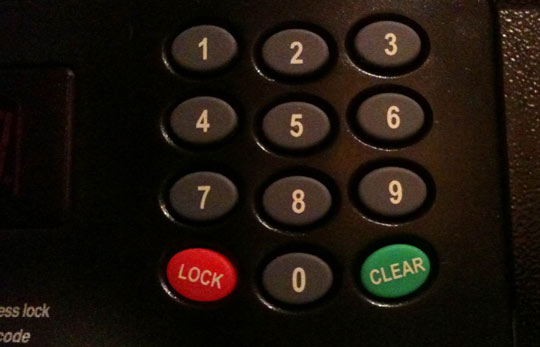
Recently I was staying in a hotel and like most hotels it had a safe in the room. To activate the safe I had to dial in a pin number of my choice and press the lock button.

I put my valuables into the safe, keyed in a 4-digit number and hit the big green button. But it didn’t lock. Instead it cleared the pin I entered.

I then read what the buttons said and the green button actually said ‘Clear’ and red said ‘Lock’.
safe.jpg

Colour association

We associate colours with various actions in our everyday life. Green tends to stand for good, and red for bad. On a traffic light, for example, green means go and red means stop.

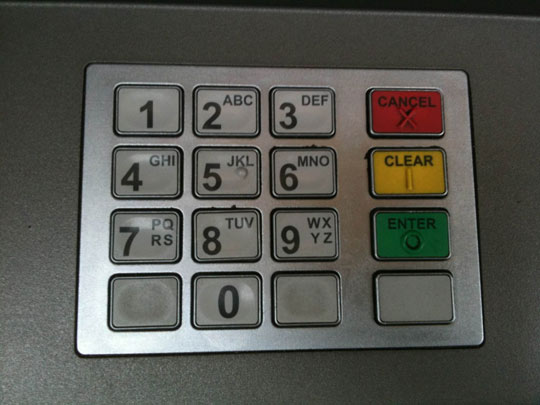
In the case of the safe above, I expected to type in a number and hit the green button to indicate that I was good to go. I based this decision on other interactions in everyday life, for example, taking money out of an ATM where I would enter a 4 digit pin and hit the green button. I did this automatically, without even reading what the buttons said.
atm.jpg

I don’t think there’s either of us at fault here, we just interpreted the colour in different ways. The safe manufacturer probably assumed red means secure, where as I thought it meant error and green meant confirm.

Applying colour to web interaction

We can use this technique in our designs too, assigning different colours to different actions.

Using red for delete or cancel actions may make it quicker for your user to make an association with that link. Likewise, green can be associated with an add or save action.

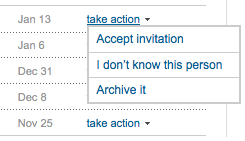
Lets look at LinkedIn for example. Here are the actions associated with someone requesting to be connected to me.
linked1.gif

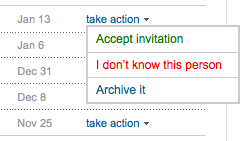
But what if we gave these actions some colour association.
linked2.gif

To me this cuts down the amount of time a user has to spend reading the action text. Instead, they are able to visually identify the green link and assume by clicking it will be a confirm action.

What are your thoughts on associating colours with actions and have you any good examples?

Want to read more?

Psst! We're hiring an Interaction Designer at Kareo. Click here if interested.

Photo of Lee Munroe

Written by Lee Munroe.

Follow @leemunroe on Twitter for more articles on UX design.


16 Appreciated Comments

Add your comment

  1. alex says:

    For my dissertation I had to include a colour scheme for rating risks on a 5 point scale. I used the same scheme the UK government uses for its terror threats scale – and it meant that at a glance managers could differentiate between severe risks and low risks without having to analyse numerical data e.g comparing green to red instead of 1 to 5.

    In my experience it proves extremely valuable from a usability point of view

  2. Mike says:

    Should colours be used on a web site for actions? Surely this would be an accessibility issue as it would lose its meaning for colour blind people. Obviously if the button etc has a text equivalent this is most likely not an issue.

    I think a lot of people claim web accessibility on their web sites but do not think what accessibility really means.

    Food for thought.. :-)

  3. alex says:

    good point mike – i should have mentioned that my icons were coloured, but each had a unique symbol on it (warning triangle, exclamation mark etc) as well as a colour, and on roll-over a text description of what that icon meant.

  4. Trae Robrock says:

    Interesting idea. I will have to keep this in mind on my next site. I wonder if the potential overuse of this would have worse effects than not using this method.

  5. Chris Mahon says:

    Interesting discussion and some valid points. Personally I think colour, as some have said, is not enough on its own. What about associating shapes (I guess icons are doing this to an extent) to actions as well as colour?

    There are also cultural things to consider. Red means danger in some places and not in others, so if you’re website covers an international market that is something to think about.

  6. Lee says:

    @Alex: Sounds like a big time saver.

    @Mike: Certainly, text should always be shown as well. So either you would have green text or a green button with text. I think I read somewhere that roughly 8% of people were colour blind (don’t quote me) so always worth keeping that in mind.

    @Chris: Very interesting. I wonder is there a place in the world that red means go and green means stop?

  7. Dave says:

    I’m with Mike on his point about using colour and the implications for accessibility, but I think that we could argue that this is a progressive enhancement to be enjoyed by the roughly 92% (don’t quote Lee on this) non colour blind people.

    The inclusion of colour, assuming the paradigm is valid in the users cultural rulebook, certainly adds a useful visual reference with probably an element of subconscious recognition. Providing it is combined with words and icons then my view is that it is a useful addition to any interface.

  8. Chris Mahon says:

    @lee my example was probably the worst I could come up with in hindsight hehe :)

    Found this with a list of colour meanings for different cultures, not sure if they can all be applied to the web but worth taking a look:

    http://www.everyjoe.com/articles/color-meanings-around-the-world/

  9. Brian Lang says:

    For true accessibility, you must consider those that are colour blind. This means that you cannot rely on colour alone. Associate an icon with an action and only then colour it.

    Also of note: I have seen electric light switches in North America where an LED on the switch is Green when the switch is off, and Red when it’s on. This seems to be backwards until you think about it. When the light is off, pressing the button marked with a green LED turns it on. When the light is on, pressing the button with a red LED turns it off. Makes sense when you think it through that way. The LED indicates what will happen when you press the switch. Not what the status of the switch is.

  10. MikeNGarrett says:

    I agree with you, definitely.

    The issues I’ve been having with color in interface design are with color schemes that don’t support the usual red, yellow and green, ie. Orange, blue and grey.

    In that case, do you think it would help to have local associations? Maybe a bright blue would be a good action, a dark orange would be a bad one?

    My point being, is it really the colors that are associated or is it the relative values of the colors that can give an element an inferred action?

  11. Semblance says:

    Colour associations do differ around the world. A simple example/s, not web related, Cream Soda. I am originally from South Africa. Green is *the* Cream Soda colour… obviously! But in the UK, the only Cream Soda available has no colour. (I just can not drink it.) The other day I had a chat with an Australian that was talking about Cream Soda. So I asked her what is the colour. She said red! Red to me is strawberry flavour.

    The same goes for Walkers crisps, which to me is wrong btw. Blue is suppose to be Salt and Vinegar and green should be Cheese and Onion.

    To me it is what I got use to. And somehow I can not change that. But colour associations change to different parts of the world. A bit tricky I would say.

  12. James Boyce says:

    @Semblance I totally agree Walkers really mess with my head also, although geographically I can’t agree that Cream Soda should be green!

    What about RSS (should be orange), facebook (blue) and twitter (light blue) links?

  13. Jim Munro says:

    Certainly true that color makes a difference for usability. Aside from the accessibility issues there is a risk of (as in your safe example) his being used for “unintended purposes” as in opt-in lists with red=”Subscribe to Spam Newletter” and green=do not subscribe. :)

    Color combined with positioning is a power duo when it comes to interaction/input. How many times have I cleared a form when I wanted to submit it? My bad for not reading, their bad for putting the clear button on the left, or is it the right? :)

  14. Mario Andrade says:

    Interesting topic. You should have developed it a bit further.

    Personally I don’t associate green to good and red to bad. I love tomatoes and firmly hate cabbages.

    But society has made a pattern and using your traffic sign analogy green means confirm an action such as Go! and red means cancel or Stop!

    Just like yellow or orange normally means caution and blue stands for quick information.