There are a lot of daily tasks a freelance web designer will go through:
- Going through emails
- Sending website planners to potential clients
- Reading and replying to returned website planners
- Quoting people for services
- Sending proposals
- Replying to current clients about different enquiries
- Going through new Twitter followers
- Tweeting
- Approving blog comments
- Replying to friends
- Writing blog posts
- etc.
After going through all these daily tasks, it can be very easy to see your day come and go without getting any ‘real’ work done.
When I finished University and started freelancing full time I found myself getting caught up with these daily tasks so I went about making some changes and trying to find a more effective way of dealing with them. Here are several techniques I use for getting more done.
Cancel blog comment alerts

Cancel any automatic email alerts from your various blogs. This means you’re not notified of any new comments or any comments waiting approval.
Instead, put these on a ‘To-Check’ list so when you have 5 minutes free in the morning/evening, you can check these sites for comments. This saves you being concerned with checking throughout the day.
Unsubscribe to newsletters
You probably get a lot of newsletters through to your email, most of which you have no interest in. It can be easy to delete/ignore them but instead make an effort to unsubscribe to any that are no use. This way they don’t clutter up your inbox at all.
Check email twice a day
This is a hard one and I’m still getting used to it. Ideally you should only check your emails twice per day. The ideal times are 12pm and 4pm (unless you’re expecting an important email/reply).
This gives you time in the morning to concentrate on work already planned and also lets you correspond with anyone between 12 & 4. No in-between wasting time. Every time you check your email it takes up a few seconds or even minutes so it’s good practice to batch process this.
The best way to accomplish this is to keep your mail app, Gmail etc. closed.
Use templates
As a freelance web designer I get a lot of requests for quotes or to see if I’m interested in taking on a project. To let me find out more about a project I will send out a website planner to gather requirements.
Rather than writing the same email everytime you receive an enquiry, have a template that you can use. This way you can copy and paste the template into the reply, and simply add the senders name at the start to personalise it.
Some email templates you should have to hand (as a freelance web designer):
- I’d like to find out more, please complete this website planner
- Sorry but I’m busy until…
- Proposal and estimate attached
And of course have Word (or similar) templates ready for your proposals, contracts, invoices etc. Any document that you’re going to need more than once.
Tweet in advance
I like to share interesting links and articles with my followers and usually I’ll find these links while going through my RSS reader. But if I’m checking my feeds first thing in the morning, it’s a bit of a waste to tweet all the interesting links at once that early. So how do I spread out my tweets? I use Tweet Later.
Tweet Later is a useful service that lets you set a time to publish your tweet. Very handy for spreading out all those useful tweets throughout the day. RTweeter is another new Twitter app that lets you schedule tweets.
Use Tweetdeck to filter your Twitter friends and replies
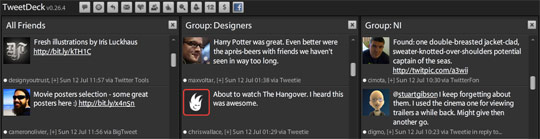
It’s hard to keep track of what everyone is doing on Twitter if you follow more than 100 people. Using Tweetdeck you can setup filters which will group particular users into 1 column. This way you can keep track of the designers you’re interested in or keep track of local tweets, keywords or business related words that you’re interested in.
Cancel Twitter follower alerts
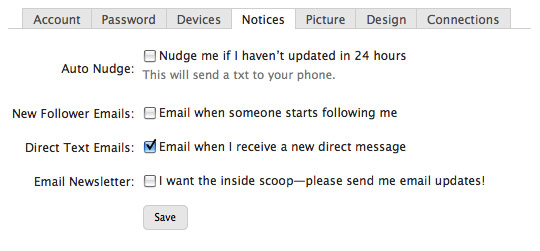
This also comes down under email distractions. Turn off automatic emails for new followers but make a point of checking your new followers at 1 point during the day. Again an example of batch processing a task.
Blogs
Read blog posts for 1 hour in the morning/night
It’s crazy how many interesting blog posts there are out there and it takes forever to go through them. Go through your RSS reader for 1 hour in the morning instead of receiving alerts throughout the day.
But what about all the interesting links appearing on Twitter during the day? Usually all these posts may appear in your reader too but if there’s a particularly interesting one drag it into a ‘To read’ folder saved in your browser favourites.
Only check analytics once a week
It’s very easy to get drawn into checking analytics multiple times a day. It’s always good to see your visitor count go up.
But instead of wasting your time checking all your websites stats daily, its much more useful to check at the end of every week and every month as this gives you a better bulk overview of your true stats.
Use a desktop blogging app to continuously write notes for blog posts
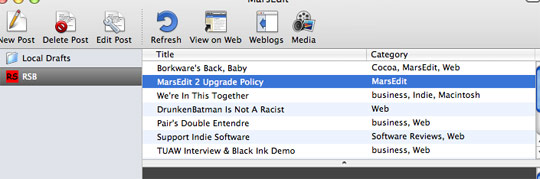
Using MarsEdit you can continuously take notes for different blog posts throughout the week, then when you have time take a look at all of the blog post ideas you’ve jotted down and finish one before publishing it. This works a lot better than sitting down to a blank canvas and MarsEdit saves you having to open up your WordPress admin area each time.
How do you get things done?
These are some of the techniques I have introduced to getting things done.
Are there any special tips or techniques you will use to get things done? I would still like to get more work done during the day so it would be great if you could contribute some suggestions.
Want to read more?
- Updated Northern Ireland’s Twitter directory
- Designing next steps
- 5 Essential Document Templates for Freelance Designers
Psst! We're hiring an Interaction Designer at Kareo. Click here if interested.


Brian McDaniel says:
Great post! Lots of good, simple points that I can do with minimal adjustment and great time gains. Thanks for putting this together!
Union Room says:
Great list Lee, especially the points about emailing and checking analytics. I’m guilty of checking those way too much.
Dani McDaniel says:
Great post! Excellent ideas.. I really need to work on the “closing email” one ;) Thanks for sharing!
Lee says:
Thanks for the comments.
@Dani: I struggle with that myself, but it works :)
D. says:
Good post, I try to batch process everything I can, during lunch breaks etc.
Frank Stallone says:
Lee this was an absolutely brilliant article. I find myself in the same shoes for almost all of the topics you cover here. For my 9-5 I have to pay attention to my e-mail more than twice daily however that is how I manage my person e-mail so I greatly agree with that… Come to think of it I agree with almost everything you have outlined here! Thanks for sharing, I always like hearing incite into fellow designers, especially designers that I look up to!
Frank
Dawn Baird says:
For me, one of the best decisions I made was to get started using Google Reader, to keep all the blogs I want to read close at hand.
And, something that needs cleared out now and then is bookmarks/favourites in your web browser. This can also make keeping up with the news, competitors, events, that much easier.
Thankfully, I’ve implemented everything on your list already. Made me feel quite satisfied with myself! Hehe.
Jacob Solano says:
I thought this was a good article and a good read. I’m a 9-5 person and I’m currently working on my updated site to transition into freelance work
One thing I didn’t quite get was the ‘Sending website planners to potential clients’
I thought of that line in a few different ways, could you explain exactly what u meant by it?
Lee says:
@Jacob: Sorry Jacob, I probably rambled off a few things I should have clarified. Basically when I am approached by a potential client, I will send them a website planner. This planner is a Word document and asks them several questions about their project, which allows me to gather their requirements e.g. What does your business do? How will you determine if this project is a success etc. After reading through this I then have a basic overview of the project, how much time it will take, how much it will cost etc.
So I have a ready made Word document that I’m able to email.
Mark says:
I personally think that this is a terrible post, and I don’t know why it’s getting all this praise, it is plain and simple common sense to get these tasks completed while still getting your work done. Also, why is this blog full of lists? Surely when you have more lists than actual ( by traditional standards ) blog content, then you’re IMO you’re just hit hunting and fishing for google positions..
But each to their own, I’m just not sure the blogging scene should be going this route for hits.. How about just pumping out good work and saving time by not writing these boring lists.
Lee says:
@Mark: You’re right, most of this is common sense. A lot of blog posts are. Sometimes though it’s good to share your experience and get the common sense techniques down ‘on paper’ so to speak.
This blog does contain a lot of lists, reason being I’m a big fan of lists. They’re easy to read and you can get a lot out of them just by scanning your eye over them if you don’t have the time for an in depth read. It’s perfectly reasonable if you’re not a fan of the blog, but the option is there if you want to read it or not.
Mark says:
That all depends on what blogs you read :) – Alot of blogs are full of extremely helpful information and tips.. – e.g. Code Snippets, how-to’s for more in depth complicated problems etc. ( yes i realise this is verging on a list ;) )
I don’t choose not to read your blog mainly because it’s not a terrible blog, I’d just like to see a bit more; either personal content or something that isnt a redux from smashing magazine from someone that is obviously creative who is from the higher tier on the social side of web-design and dare i say it, ‘ 2.0 ‘ esque blogosphere.
Sean Delaney says:
Good post Lee.
It was interesting to kinda see “a day in the life of Lee Munroe” going on there.
Nice list, very similar to my daily tasks apart from a few.
http://www.seandelaney.ie/blog/2009/07/31/my-freelancing-life/
Janko says:
Excellent tips. Probably the hardest one is to read emails only twice a day. Couldn’t agree more, Lee.
Andrew says:
With newsletters – I use filters (a different filter for each newsletter), this way it allows me to scan the newsletters when I have time.
Filter email – use filters to isolate emails from different clients and use them to separate friends from business. This way when you check your email you can quickly see who has sent you an email.
Auto responders – if you are busy for a day or two, use an auto responder. Better to let a person know that you have received their email, but you are busy at the moment and will get back to them later.
Checking Email – use your email client only to check your email at certain times of the day. That way you will not forget to check it.
James Kurtz III says:
Good tips. Another thing that I’ve been doing in my e-mails is using Snippets on Mac (there are other solutions for Windows, and GMail has canned responses). There are certain things that I have to type and retype on a daily basis. It really helps speed things up.
Shay Howe says:
Lee this is a great article. You pointed out many of the things I do on a daily basis that I definitely need to scale back on and organize.
One question though, shouldn’t you take your own advice? Looks like you are keeping up with the comments here fairly well, are you getting email notifications? I’m just kidding, thanks for the good read! :)
Alex says:
Thank you for sharing, very good post. You mentioned Website Planners, do you have any samples of how this looks that you can provide?
Thank you
Sean Delaney says:
@Andrew – Using filters is a great way to separate out emails, newsletters and so on. I’m currently using filters for my emails…
Anyways, good comment for other readers!!
Denny Sugar says:
Nice tip on mars edit!
Mark D says:
Good Tips. Ive never used a RSS reader. Need to start doing it. Find myself pulled into smashingmag and lifehacker, and before I know it, its an hour later. Same problem with twitter. I will use the filters on tweet deck and looks for a good rss reader. Also going to have a look at mars.
Kevin Tomasic says:
@Mark – You’re right about this post being common sense. However, anybody will tell you that these days, common sense isn’t very common anymore. :)
There are also those who are just starting out as freelancers who don’t know these things for lack of experience. For them, this post can be very useful.
Karl says:
Great post Lee. Email & Twitter are by far the biggest time wasters in my working day. I really streamlined down what was in my RSS feed and cancelled quite a few newsletter subscriptions etc, and it does help.
It’s the good old 80/20 principle once again! :-)
Elf Sternberg says:
You can filter blog comment emails as well. I have a folder, “BACN” (It’s spam you want), into which goes the daily autoforwarded stuff– blog comment entries, google notifications, newsletters, and so forth.
David Bennett says:
3 keyboard shortcuts to speed up dealing with email in Outlook; Ctrl+N for new message, Ctrl+Enter to send and Ctrl+Shift+V to move message to folder.
I played around with the idea of having all blogs I like to read displayed all in the one location (the page reloads every 5 mins):
http://www.david-bennett.net/blogs/
Lee says:
@Mark: Thanks for the comment and duly noted :)
@Sean: Your ‘day in a life’ post is an interesting read, thanks for sharing
@Andrew: Thanks for the tip – use email filters
@Shay: True, you caught me :) On days I publish blog posts I do tend to check for comments more regularly, and as a consequence I get less ‘work’ done
@Alex: Interesting as a couple of people have contacted me looking for an example. I think I’ll put together a future post looking at website planners
@Mark D: NetNewsWire is a good RSS reader for Mac
@Karl: I could do with streamlining RSS feeds myself
@David: Interesting idea. You can setup your own page on AllTop now too, might be worth looking at so you can add all your favourite blogs
Paul Cook says:
You read a lot of lists about productivity and sometimes they have a few good tips, sometimes they rehash the same old things and sometimes, as is the case here, they squarely hit the nail on the head. Very clear breakdown of todays time killers and how to minimize that. Nicely done.
Juan Ortiz says:
soo true about closing your email and dedicating a specific one hour frame to rss…
and good to see everybody has to make an effort whit this
lewro says:
I agree with all the above and have similar approach. I am not freelancer (yet) so I had to implement working early mornings so I could get things done. Getting up 5am gives you 2-3 good hours to work on your own projects and it starts your day nicely ;)
Kai Köpke says:
yep. every morning a cup of coffe and an hour of feed reading instead of all over the day can safe a lot of time.
Barry Khan says:
Good tips… funnily enough I canceled comment notifications this morning….
Bimal says:
Plus, some healt tips and resfulness would also increase the productivity of the freelancers.
Jack says:
I’m just getting in to the Web Design and Development sector and I am finding your posts really useful :)
Thanks,
Jack
Ian Lawson says:
I saw your mention of website planners. I own a small web agency that is creating a free web app called SlickPlan (http://www.slickplan.com). Its about to launch in a week. You can easily create sitemaps based off SlickMap CSS.
Mark says:
Good points. I am always trying to figure out ways to better balance work, checking emails, reading and commenting on blogs, writing my own blog posts and social media among other things.
Mic says:
Some nice tips.
I’d recommend checking your sites stats everyday. If you manage alot of profiles in Google analytics a sudden drop in traffic can act as a red flag. For instance if one of your sites got hacked, you’ll need to be aware of this asap and checking analytics will alert as quickly as everything.
Also if you are emphasizing product support and rapid response, checking your email twice a day isn’t great support.
sonnydesign says:
i love being a freelancer so much. i can relate to this article. I worked before but i decided to be a full time freelancer and i love it. Im always excited to wake up early to check my email.
Freelance Web Designer says:
I am totaly agree with you about everything.
As a freelance web designer , I am going to start applying everything you said here , lol, half of my day is weasted reading some useless emails ;-)
Regards
webpage maker says:
I am not freelancer (yet) so I had to implement working early mornings so I could get things done. Getting up 5am gives you 2-3 good hours to work on your own projects and it starts your day nicely. thanks..
Sean Delaney says:
@webpage maker – 5am?? What time do you finish working in the evenings? Do you actually take any rest or social time…? The bags under your eyes must be massive!
Murlu says:
I try to keep up with my weekly planner. I used to do a daily planner but it didn’t have any long term impact because I’d simply skip over certain things throughout the day to place on another day.
I set aside an hour a day to read blogs which I accumulate from Twitter and RSS throughout the day, I try not to read them as they come it, just load them and keep them in the background.
I used to have many newsletters but I unsubbed from 90% of them.
I have a ton of free time now, almost to the point that I don’t know what to do with it ha!
51 Website Design says:
I have a todo list on a schedule. I simply finish whatever I can; and when it comes to reading my email, which I read for no more than 30 to 40 minutes, I read the ones relevant to my current interests. Other than that, I follow my daily todo list. Try out http://www.rememberthemilk.com for making a todo list. It’s great when you’re working on an organized schedule :p.
ne-web says:
Great list, cheers.
I’m a big one for constantly checking Analytics, website rankings etc of my sites all the time.