Recently James at Helikopter Design asked myself and various other designers “What’s the one thing you couldn’t live without when designing a website?“.
Rather than going for Photoshop or Coda, which are understandably popular answers, I replied with:
I’ll go for A3 sheet of paper for sketching and notes – this is where all my web designs start.
Always start on paper
A3 pads are great. They’re small enough to have at the ready in your workspace but they’re big enough to let your creative mind flow.
The first several steps of a project I’ll use A3 paper:
- Taking notes from a client or from their website planner
- Mindmapping for ideas
- Sketching a sitemap
- Sketching wireframes
Paper should always be your first port of call, long before you open Photoshop or your code editor.
Doesn’t have to be perfect
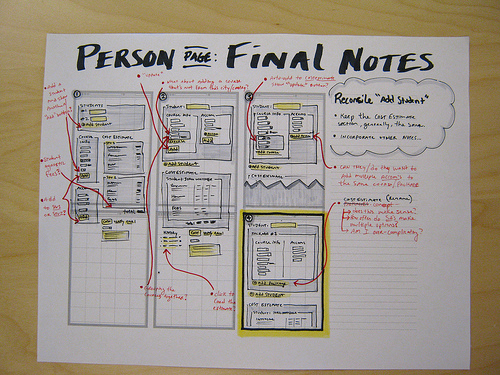
Sketches above from Jason Robb
Remember your sketching isn’t going to be put on display in a museum, nor is it going to be marked by your art teacher. You’re aiming for rough sketches that you can identify with. Wobbly lines, thick boxes, unreadable writing, random cartoons around the page – this is all part of your sketching experience.
As long as it makes sense to you and helps you visualise the end goal, it’s working.
My sketches
Examples of my sketches, which I have lying all over my desk.
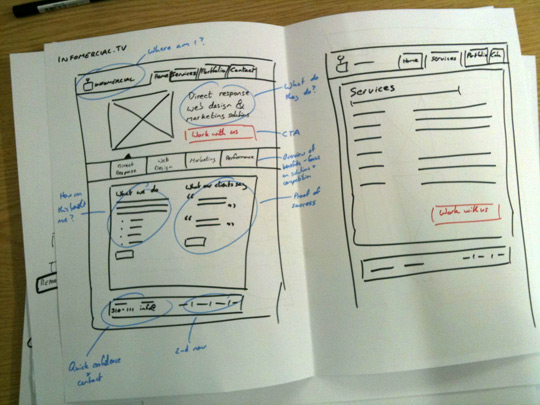
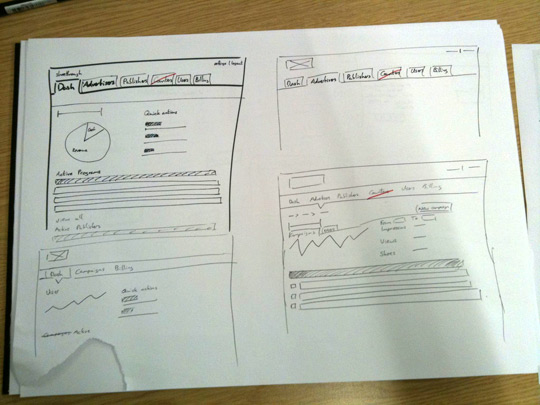
I use a thick black marker for drawing out boxes and wireframes, thin pen for writing stuff, red pen for highlighting important stuff and a blue pen for notes.
As you can tell, I don’t spend very long making them look good but this is all I need. This gives me the visualisation I need and a basis to go on.
If you don’t have an A3 pad, go and buy one.
What do you use for sketching and wireframing?


Conor Darcy says:
Don’t use that much paper to be honest as I like to present print outs to clients for approval. I use Free Mind, a free PC mind mapping app. Usually I print out a diagram and discuss with the client. Next I draw up a sitemap in inDesign. The reason I do this is that everything ends up in a PDF document for the client and it’s easy gust to do it there and then. Wireframes are created in iPlotz, you can drag and drop common website elements to your page. It also has limited prototyping ability, nice exporting and file sharing. Suppose it would be better to sketch each stage before hand.
Alan Anderson says:
Great article lee, I use my mindmapping app for brainstorming, a great app called Ommwriter which is still a beta and mac only for writing content in and adobe fireworks cs4 for my wireframing. Starts with simple boxes for main elements then as the design grows it then has text, images etc added really easily from photoshop or illustrator.
I agree with you tho with regards the pad, I generally only use one myself now if I get a bit of creative block and venture away from my desk with my ipod & a4 pad to clear my head & sketch ideas before transferring them to the computer again. I stopped using paper for my wireframes about 6 months ago when my son developed the knack of getting to my desk and using any pens / paper I left lying around to draw me pictures, quite a few contracts/wireframes/proposals got the mini blue tube design angle added at short notice.
Mark McCorkell says:
Interesting that you should post this, because I was just quietly pondering to myself today what other people use for Wireframing!
I actually use A4 Whitelines paper, which is like an inverse of graph paper, it is a very faint grey, with white lines/squares. The advantage of using it is that it will help you draw, but the lines disappear when you scan the page in then. Example on Flickr
I would use it for mind-mapping and pretty much everything. I scribble lots of notes too on the wireframes so they aren’t the most tidy – but they do help me, which I guess is the whole point.
There people that don’t appreciate this part of the process, but when you try and work without it you can run into waste a lot of time in Fireworks/Photoshop. I’m no illustrator, but using the paper to figure out basic compositions really does help speed things up when you sit down on your mac.
Chris Sisk says:
As an ex imd student you will be happy to hear they are hammering this method of designing into us current students! At first I hated drawing out plans etc I just wanted to start coding and design using css but now I am finding it so much easier to put ideas down on paper as you can “see the bigger picture”.
I find pen and paper works really well when making web apps, as you are usually making a number or screens and views. Its also easier to scrap an idea on paper if it’s not working out rather than scraping five hours worth of code experimentation!
Greg Wallace says:
Have to totally agree Lee. Always get busy on paper first with designs and layouts before Photoshop or Illustrator are fired up.
Purchased an A4 Web design sketch book a while back which has different sized grid layouts with browser chrome details on them.
Available to purchase here: http://www.inventis.be/blog/buy-your-webdesign-sketchbook-here
Guess my ideal solution would be to scale that sketch book up to A3 like you use with the grid layouts included as I find A4 a bit confined sometimes.
Been wire-framing with a cool online app called HotGloo as well: http://www.hotgloo.com
Like your new site design. Nice, clean work.
Lee says:
@Conor: I know what you mean. I generally use paper for me, but then convert the results to PDF that can be sent to the client.
@Alan: Stopped using paper? Wha!
@Mark: Paper looks sweet! Is it available in A3?
@Chris: Good to hear :)
@Greg: A client actually gave me browser chrome paper/stencils for Christmas, which was really cool, although I haven’t used them yet – been saving them for the perfect project
rezyde says:
I always find a moleskin notebook to be excellent to write down ideas and work things out in my head before I proceed any further
Rachel says:
Great article..really informative…
Alan Anderson says:
lol I haven’t stopped using paper I still use it to transfer everything onto the computer very quickly, when you have have kids sometimes it changes how you work, I had a design ready to scan into the computer and my son came in and wrote all over it in marker ;)
If you team up fireworks with a wacom pad its just like working on a pad of paper, but without the pile of paper on the floor beside you of scrapped ideas ;)
Danang Sukma says:
i new beginner in web design, that very usefull for me…
I usually use A4 paper to draw requirement of the client, but these forms are very simple sketches and I finish it in photoshop. But I have to do repeatedly in photoshop, because my client did not understand most of what I describe in the paper LOL
Pauline says:
I use loose sheets of A4 paper and a pencil for everything from pseudo-sitemaps, to layout sketches, to follow-up questions for the client. A lot of this gets transferred to electronic form at later points for organization’s sake, but I find it easier to always start ideas on paper.
Rick Upshaw says:
I have to say that I have done a lot of sights (blogs, mostly – I’m not nearly at your level of expertise), but this is the first time I’ve heard this or considered this. I guess sometimes we get our heads buried too far into our computer screen to think about keeping things simple!
I also really appreciate the images you provided here of some examples. Very helpful to a noobie like me. Thanks!
Mikey McCorry says:
I just bought a new printer (Epson Stylus Photo TX800FW) which has a “Print ruled paper” option. This can print out a light-blue ruled graph paper (about 5mm x 5mm). This has been great for design sketching and wireframing. I’ve got about 20-30 pages printed off and clipped onto a clipboard and it’s been working wonderfully for me. Prior to this, I was using a spiral-bound A3 pad similar to yourself, which was also good. I liked the @jasonrobb example that had the printed 3×2 page layout (joining two pages together for longer pages).
Jon says:
Probably the most efficient way to achieve a solid design. Whether it be a template, mock-up, or the final product, it really does take the A3 to achieve everything you want out of your site. Bravo on the write up, Lee.
Manila Cheap says:
Here’s an idea: Why doesn’t someone come out with an application for use with those computers with the screens you can write on (I can’t remember the term I’m looking for because I’m having a brain-fart at the moment) where you can draw out the website just like what you’re doing in the pictures above, and actually create the website just like that? Aren’t we just about at the point now in our technology where we could do such a thing? Probably there would be a few “taps” here and there… that kind of thing… and perhaps it wouldn’t work for extremely advanced sites, but for blogs or simple sites that are… say… 20 pages or less could probably work! What do you think?
Jon says:
The idea is brilliant, but if you don’t develop it yourself (the proud idea-owner) then what more can you expect from the world?
I say, you develop the idea and make it happen and show the world just how easy it is.
web designer Delhi says:
It is Great article really informative