The importance of user testing copy and content

After user testing a prototype of a new product feature (in this case a setup wizard), it took us 2 or 3 tests to determine issues like where a button should be placed, if it was distinctive enough, if the general layout and structure made sense.

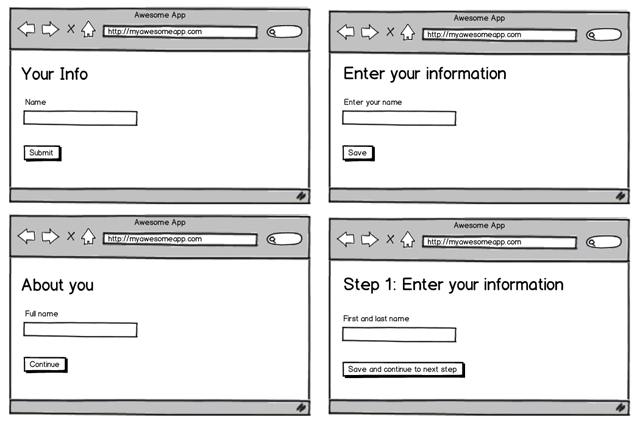
That was straight forward, however it took at least another 10-15 tests to determine the wording and copy to be used.

User testing copy and content
content.gif

Early user testing is an important part of the product design cycle, but it’s important to not just focus on general layout and positioning, but think about the copy and content as well, and not just “figure that out later”.

For web applications this includes:

Takeaways from user testing copy and content

These were the main issues we found with our copy through user testing:

  1. The user didn’t understand it due to the wording or jargon used
  2. The user, in general, didn’t read instructions on screen and preferred to just click stuff to see what happens
  3. There was too much to read so the user didn’t bother reading it
  4. Inline help is useful, particularly for first time users, not so much for return/power users
  5. Users weren’t 100% sure what would happen when clicking certain buttons or links

Every couple of tests we would change the copy based on feedback and observations then continue to test. So by the 15th test, there were a lot less issues or questions from the user. That said, there is always room for improvement and we’ll continue to test it and gather feedback.

Copy and content is more important than visual design

As a designer, what often matters most to you is what the user’s reaction is to the UI design; the colours, the textures, the use of subtle insets here and there.

Unless you’re building a product aimed at designers, users rarely care about this. They care about finding or producing content, so the copy that helps them accomplish their goal should be easily and quickly understood.

Don’t leave content or copy until the end. Make sure it gets tested early on along with the rest of your interface so you can iterate and improve it.

What are your biggest takeaways from user testing?

Further reading

Related articles


10 Appreciated Comments

  1. On the , Andrei Potorac said:

    Lee, what are you using for usability tests? So far we’ve used Usaura, and we’re pretty thrilled with it. For example, check our latest test http://www.usaura.com/test/9bd427797748fe6e1515

    :-)

    Any other tools you can recommend?

  2. On the , Lee said:

    @Andrei: Nice, haven’t used Usaura before. I like it. At the minute I’m using Axure to put together high fidelity prototypes, user testing in person or GoToMeeting for remote tests, and Verify for mass feedback remote style tests.

  3. On the , Andrei Potorac said:

    Thanks, will check them out.

  4. On the , Michael Heraghty said:

    Hi Lee, some great points as usual :)

    I like the way you didn’t just do one test — you did a series of tests, and it sounds like you tweaked as you went along, rather than going right back to the drawing board each time.

    This is the advice that Steve Krug gives in his book ‘Rocket Surgery Made Easy’, i.e. after each test, focus ruthlessly on the 2 or 3 changes that will make a big difference — and ‘do the least you can do’ to implement them.

    Often, the goal of usability testing is to iterate and tweak than to redesign.

  5. On the , Jeremy Harrison said:

    Thanks Lee, good stuff! I was at the Online Marketing Summit in San Diego last winter and one of the lead guys from Obama’s campaign (former Googler) talked about how testing and finding the right submit button text and color made a difference measured in millions of dollars. I usually work with small businesses where a lot less money is on the line, but that lesson really stuck with me.

  6. On the , Gabby said:

    Lee,

    I’m a big fan of content strategy, but I don’t agree with your claim that this testing necessarily shows that copy and content are more important than design. Why wouldn’t the fact that design flaws are caught with only a couple of participants actually argue that design is MORE important than copy?

    I don’t want to stir the pot too much, but wanted to help with your logic. We also need to get better at knowing when to use each kind of testing for content. So much to do!!!

  7. On the , Lee said:

    @Gabby: You make a good point. It depends what we mean by the word ‘design’. I mentioned that I think copy and content is more important than visual design, and by that I mean the time and effort that goes into defining copy and content should be higher up the priority list than aesthetics. Once it makes sense to users, we can make it look and perform better visually.

  8. On the , Derek Poppink said:

    I completely agree with your main point, Lee. User testing content and copy is very important, and was seldom emphasized in early UX literature.

    I disagree that copy and content is more important than visual design. Studies show that users’ emotional or visceral response to the visual design is frequently as important or more important than their rational, reflective response to the content or copy: http://www.websiteoptimization.com/speed/tweak/blink/

  9. On the , Dawn Baird said:

    I agree Lee, and as a Technical Writer, I love to get involved in this stage of the design, even if it’s only looking over someone’s shoulder and making suggestions when they get stuck on the wording for a dialog box. My rule of thumb is: less is more. You can always cut the words down further. :)

  10. On the , MichWalkden said:

    Interesting to see the content vs design argument continuing. I’m a content producer so you can guess which side of the fence I belong on. Perhaps the biggest lesson here is not which is more important in isolation but that they need to be developed in tandem.

Have a comment? Tweet @leemunroe and I'll be glad to respond.