Performance is something you don’t often think about. You assume that if it loads quickly enough for you then everyone’s happy. Someone commented a while back saying that it takes quite long for my pages to load so I optimised it a tad and thought I’d share a few quick tips with you.
1. Use CSS sprites
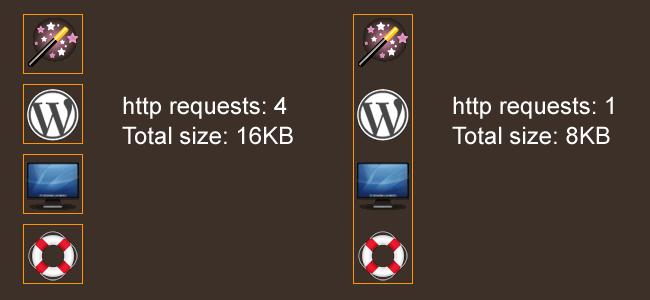
Rather than having multiple CSS background images for your page, you can use CSS sprites to combine multiple images into one graphic. This reduces overall filesize and the amount of HTTP requests.
Once you do this you can use CSS to control the background images.
#services ol li{
background:url(images/homeicons.gif) no-repeat;
}
#services ol li.design{
background-position:0px -460px;
}And as you can see the size and http requests are reduced considerably.
2. Use an external CDN
A CDN is a content delivery network and it basically means use scripts that are hosted on other sites. Why? Because users might not have to download the script when they visit your site as it’s already cached.
Google has an AJAX Libraries API that you can use.
<script src="http://ajax.googleapis.com/ajax/libs/prototype/1.6.0.3/prototype.js" type="text/javascript"></script>3. Install YSlow
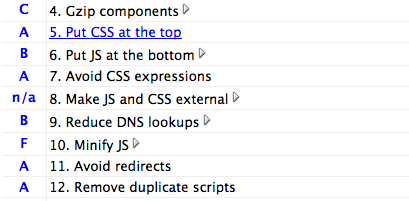
YSlow is a very useful optimisation tool for Firefox. YSlow will report on any page you load up and will give you information about the amount of HTTP requests, CDNs used, CSS and JS compression and will give you a grade for each and tell you how to improve the page so it loads quicker.
- First you need to install Firebug. YSlow runs alongside this add-on.
- Now install YSlow.
- Watch this screencast on how to use YSlow
4. Put JavaScript at the bottom
Put any JS requests that you can at the bottom of your code, allowing your content to load first. This includes any Twitter or Analytics requests. This way your site content can load before trying to load external JS files.
5. Optimise graphics for web
Save your images for the web in Photoshop and you can alter the image quality, reducing the file size considerably. Of course I’d like to think you were doing this already ![]()
In Photoshop, File > Save for web & devices

More tips
- Cache your pages – Wordpress cache plugin
- Make sure all your Javascript and CSS is external (not inline)
- Compress your CSS
- Compress your Javascript
How else can you optimise your website?
March 16th, 2009
Danh ba web 2.0 says:
Nice post. Thanks for share !
March 16th, 2009
Shane O'Grady says:
Smush.it (http://smush.it) can trim down graphic file sizes even more than Photoshop
March 16th, 2009
Adam says:
Some great tips here, Lee. Didn’t know some of them. I found a great little plugin for Coda that does CSS compression quite nicely a few days ago (http://www.panic.com/coda/developer/community/plugins.php)
March 16th, 2009
Pete says:
Nice tips lee! Didn’t even know you could get an external CDN until now from Google, that will be useful!
March 16th, 2009
insic says:
nice article. i agree in using css sprite.
March 16th, 2009
saurabh shah says:
nice tips …!
March 16th, 2009
Kluas says:
and where is the news?
March 17th, 2009
Aaron says:
The CSS sprites tip is great. I want to do this with my social network icons. I’ve seen other stuff on this and I can’t say I completely understand how to do yet. I’ve done CSS rollovers before, is this similar? I don’t suppose you could point me toward some more explanation on this topic? Thanks!
March 17th, 2009
Ryan Coughlin says:
Just popped up on my delicious rss feed, great article lee. excellent pointers for optimization! keep it up.
Ryan
March 17th, 2009
zoel says:
I think, “4. Put JavaScript at the bottom”, some javascripts(js) can’t works if do it or it will make conflict if we use some js
frameworks
March 18th, 2009
Tom Ronda says:
Hi,
Fireworks is actually better tool to optimize web graphic. I have seen it demonstrated at two Adobe Creative Suite presentations and difference in file weight was substantial. Another thing is that I still cant understand why Adobe do not equip Photoshop in the same mechanism, as they own both applications and charge lot of money for Photoshop.
March 19th, 2009
Lee says:
@Shane: http://smush.it looks good, thanks for sharing
@Adam: Coda compression, brilliant, that’ll be handy
@Aaron: Yes, basically all your icons are combined within 1 graphic, then you control their position with CSS
@Tom: I’ve been meaning to use Fireforks for about a ages now and just never got around to it. Going to have to check it out.
Thanks for the comments and tips!
March 19th, 2009
Andy says:
Some excellent tips
I have used GZip as the compressor on large ExtJs files that can reduce file sizes by as much as two thirds
Its also good practice to cache files that you know are not going to change and avoid too many http requests and as you pointed out this is another advantage of using sprites. There is also the YUI compressor to minify your code
A good point of reference is http://developer.yahoo.com/performance/rules.html
March 20th, 2009
Kelly says:
These are great tips, especially the CSS sprites one!
Another one is to optimally split up your CSS and JS files. If you’ve got a section or page on your site that uses a lot of specialized CSS and JS code, split it up from the site-wide files so the other pages don’t have to load all that code. This technique should be used with discretion though, because it does increase the number of requests.
March 29th, 2009
Lee says:
@Andy: Good point, caching is something that should be implemented, especially for larger sites. There’s a handy Wordpress plugin http://wordpress.org/extend/plugins/wp-cache/
@Kelly: Well said, thanks for the tip.
April 25th, 2009
Klesus says:
Uhmm, correct me if I’m wrong but isn’t number 4. “Put JavaScript at the bottom” something that depends on what framework you use?
I believe the jQuery’s $(document).ready() for example is made so that everything in the ready parenthesis executes first when the DOM is ready = all content have loaded.
May 1st, 2009
grosser says:
you can also losslessly-batch-optimize all pictures in a given folder with smusher http://github.com/grosser/smusher
May 20th, 2009
Gray says:
Nice article thanks. Will be getting onto my site and optimizing graphics, putting Javascript at the end etc…..
June 16th, 2009
Nick Yeoman says:
Great tips! here is another you can add:
Use php to remove all the comments and whitespace from your css file to reduce the size. Then use php to create one file out of multiple files to reduce the number of server requests and increase page load time.
July 5th, 2009
Bill Kalpakoglou says:
Really some handy tips. Thank you for posting this.
July 27th, 2009
Quaym says:
Excellent tips. I’m def going to use them!
October 13th, 2009
fajarfaqih says:
thanks lee. I like your CSS sprite technique ^_^
October 15th, 2009
Lee says:
@Nick: Great tip Nick – is that using GZip?
@fajarfaqih: The CSS sprite technique is awesome