I came across this problem when I converted to a Mac and I was trying to connect to a MySQL database on MAMP using CocoaMySQL. CocoaMySQL wasn’t able to connect to the database. Thought the solution may be useful to others.

Settings

Host:localhost
User:root
Password:root

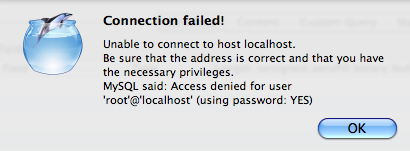
If you try to connect now you may get the following error:
Unable to connect to host localhost.
Be sure that the address is correct and that you have the necessary privileges.
MySQL said: Access denied for user ‘root’@'localhost’ (using password: YES)

CocoaMySQL error

Solution

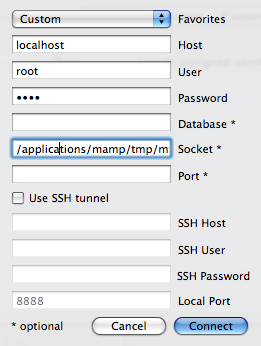
So here’s the extra bit. Enter the following in the socket field:
/applications/mamp/tmp/mysql/mysql.sock
Picture 30.png

Happy days!

Unlimited Freelancer
Lee Munroe
About the author

Lee Munroe is a freelance web designer from Belfast Northern Ireland. Like this article? Feel free to follow Lee on Twitter.

Comments

Add a comment
  1. Gravatar

    Ah, yes I remember this form when I first setup MAMP/CocoaMySQL. Actually, I tend to use MySQL Tools’ Administrator and/or Query browser for my MySQL needs and don’t use CocoaMySQL but perhaps I should give it another whirl.

  2. Gravatar

    Thanks for the tip, CocoaMySQL (now Sequel Pro) works great, one question though, is it possible to connect to a MySQL database that´s not on my computer?

  3. Gravatar

    @JesperA: Yes you should be able to, as long as your host allows it

  4. Gravatar

    I have spent ages trying to figure this out. I put in my very specific google query with little hope of an answer and here it is! Thankyou thankyou thankyou!

  5. Gravatar

    thanks a million! That was just the information I needed…

  6. Gravatar

    This post is a little lifesaver to those of us dabblers in the realm of MySQL (who don’t understand the gory details, nor want to). In Sequel Pro (CocoaMySQL’s replacement), this hint can be used to connect to MAMP MySQL, but isn’t required. In Sequel Pro, there are two ways to connect (actually, three, but SSH is over my head): Standard and Socket. In Standard, you can connect using host “127.0.0.1″ and port “8889″. In Socket, you can connect using host “localhost” and socket “/applications/mamp/tmp/mysql/mysql.sock”. Some of this info is also alluded to on the welcome page that opens when you start up MAMP. By the way, for any Rapidweaver users out there, you can use this hint for viewing MAMP MySQL data (via PHP scripts) live in Rapidweaver’s preview mode. The PHP script to make the MySQL connection just specifies the host as the path to the socket, instead of “localhost”, for example:
    $con = mysql_connect(”:/applications/mamp/tmp/mysql/mysql.sock”,”root”,”root”);
    Note the “:” at the start of the path.

  7. Gravatar

    hello guy, can you send me a example code how to connet to mysql with cocoaMSQL in iphone? i have problem with that. thanks a lot.

Add a comment