Great user experience with gradual engagement sign ups

Lets be honest. Sign up forms suck.

As designers we often get carried away with how a sign up form looks and forget about the user experience. Border here, rounded corners there, maybe a hint of shadow…

Truth is users don’t care about how it looks. They care about getting through the form as quickly as possible. They care about what information you’re asking for and why you need it. They care about getting access to your website or app so they can start using it.

What’s the minimum amount of data you need to let someone in?

Ask yourself “Do I need to know this right now?”

Email address

The one thing you need to create an account is most likely an email address.

Everyone online has at least one email address so this is the perfect way to identify someone using your app and when you have their email you can contact them, send them setup details, keep them up-to-date.

Password

You more than likely need a password as well to let users into your app.

That said you can always email them a password then let them change it later, for the sake of giving them even quicker access.

It’s debatable whether you need a field to confirm the user’s password or not.

Username

If your app involves some sort of public profile, you’ll need a username that will identify the person. This username can then be used for login, as well as their email.

What you (probably) don’t need to know “right now”

All these are extra fields that will potentially scare your user away.

I don’t know what the stats are but I guarantee sign up forms that have these required fields end up getting a good lot of Joe Bloggs, born on 1st January from Beverly Hills 90210. Why? Because users just want quick access and they’ll enter the first thing that comes to mind that doesn’t lead back to them.

Gradual engagement

I’ve been reading Web Form Design: Filling In The Blanks, where Luke Wroblewski talks about gradual engagement.

Lets look at this process.

Sign up process 1: Facebook
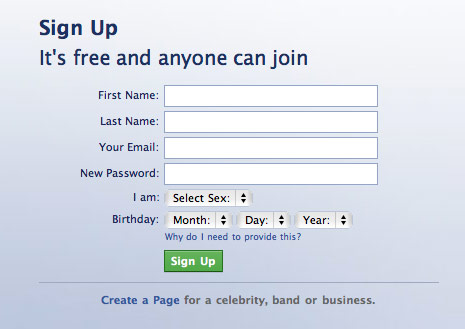
facebook.jpg
  1. I’m presented with this form. This is enough to turn me away as there are quite a few fields.
  2. After submitting these details I have to complete a captcha for anti-spam.
  3. I successfully sign up but an activation link has been sent to my email and I need to verify. I have to leave the site now to check my mail.
  4. Verification email link clicked. Thankfully this wasn’t delayed or marked as spam.
  5. I’m in. Now to complete the process, find friends etc.

See how many annoying things happened here. The thing is though, Facebook can get away with it. Your website can’t. If this was another site and Facebook wasn’t one of the biggest sites on the planet, you probably would have walked away by now.

Sign up process 2: Twitter
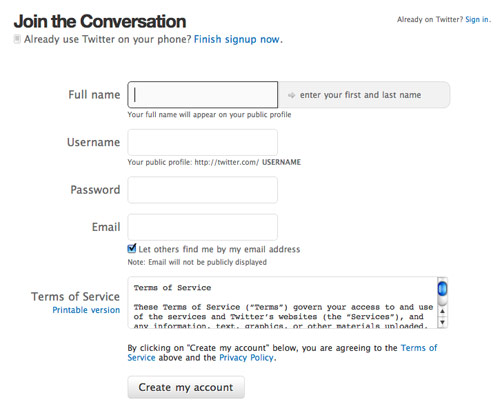
twitter.jpg
  1. Sign up – pretty good, bit more fields than I would like but satisfactory.
  2. After submitting details I’m presented with a captcha for anti-spam.
  3. Now I’m in and I can start using it.

Twitter definitely has a nicer sign up process than Facebook. They also sent me an activation email but notice how Twitter lets you into their app (with limited access) before you have to click the activation link. Good job.

Sign up process 3: Geni

Geni is a family tree web app and has a very interesting sign up process:
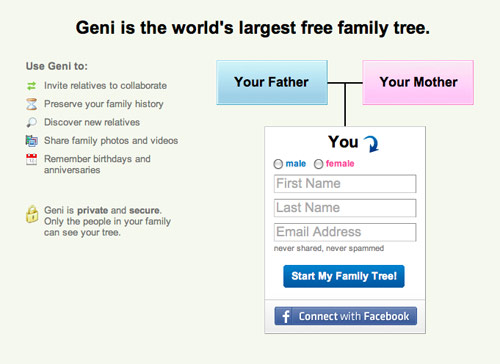
geni.jpg
  1. You don’t sign up, you just start making your family tree.

Geni has a form on the homepage that records your email address, which is all they need to setup your account, but it’s cleverly disguised as part of the application so I never *really* sign up. Instead I’m jumping straight in and using the service.

Behind the scenes Geni has emailed be a temporary password to use until I create my own.

This is gradual engagement. I’m able to start using the service without actually signing up. I’m happy as there’s no time wasted. They’re happy as they have another user using their service.

Conclusion

Try to get the user involved first before asking them to sign up, then only ask for the information you really need.

If you need email confirmation (to prevent spam accounts) let the user continue to use your website in the mean time. Maybe close the account after a week or a month if they still haven’t verified, or restrict access to certain parts of your app.

Don’t scare users away with many fields. Often zip codes, DOB, even names can come later. Let them in fast.

For handiness make use of Twitter oAuth, Facebook Connect and OpenID etc. so users can sign in with 3rd party tools.

Further reading

This blog post is based on my own interpretation of a chapter of Web Form Design: Filling In The Blanks.

I highly recommend this book if you’re a UI designer as you undoubtedly work with forms daily. If you’re interested in usability, eye fixations, error prevention, web apps etc. then you should read this book.

What annoys you most about sign up forms? Have you tried gradual engagement?

Related articles


25 Appreciated Comments

  1. On the , Lea Verou said:

    Sending the user a temporary password is a really bad idea. Most of them don’t bother changing it, so they end up using that. Until they are logged out and can’t remember it.

    Also, it’s not just that “facebook can get away with it, you can’t”. Facebook asked for those data right from the start. Most users don’t fill in optional information. So yeah, if you ask for less data, you end up with more accounts, but with emptier accounts. Whether that’s a good thing depends on the nature of your app. It’s a tradeoff: More users vs more data/user. For facebook, obviously more complete user profiles is more important than more user profiles. This is why they are asking for more data, not just because they can.

  2. On the , Mark McCorkell said:

    Interesting article there, Lee.

    When you launched your new site here I noticed the way you have crafted your comment form here to encourage users to write a comment first before they have to fill in their details – this works. And anyone who know’s their UX would notice the thought poured into it too.

    A lot of people do take these things for granted and do focus too much on making things ‘look’ right before they focus on making them engaging.

    I would love to read that book, but I have been slacking on my reading lately. I will add it to my wishlist though!

  3. On the , Gareth Watson said:

    Another interesting article Lee and one that will no doubt spawn another heated debate on the topic at hand. While I do agree with what you say in regards to keeping the sign up process as simple as possible I also believe that we are at the stage now where users are a little more experienced with the web and can make their way through a sign up process such as Facebook use with little effort. I do not see their sign up form as being too much.

    I also prefer and am in favour of the idea of account activation via email verification as in the long run this should create a richer userbase. The same goes for email sign-ups with an email being to sent to the user to confirm that they wish to opt in. It might mean lesser sign up and email addresses but in theory the quality if user should be better.

    The captchas I’m not so keen on. I mean do these really stop spam accounts being created or are they just a nuisance to the user – especially when accessibility is taken into consideration? I’ve had a few clients ask for them and I’ve explained my thoughts on them. Sometimes the client has insisted that they be included anyway and others have dropped them altogether.

    I agree that what should be required for sign up should be the bare minimum of information with completion of other elements not being required until after log in – such as what you use for Lookaly. I think that this process works best in most scenarios.

  4. On the , Alex said:

    I completely agree with gradual engagement, and recently I had to strip back a form from about 16 fields to 4 fields and the change has resulted in a greater uptake than before.

    One thing to be careful of though if you’re using Twitter oAuth, Facebook Connect or OpenID, for the sake of the user make sure you get enough information in your system to enable them to recover an account at your site if they ever decide to leave Twitter, Facebook or OpenID.

    Facebook recommends it as part of their account retrieval process and documents it quite well, but the basics include keeping hold of the user’s email account on your system at the very least.

    It’s worth noting that one of the first sites to use Facebook Connect saw a massive jump in signups when they implemented it versus just having their own signup process. This is probably similar to the Amazon buy button effect.

  5. On the , Des said:

    Nice post Lee.

    I think TripIt really pushed the boat out by skipping signup altogether.

    The key point is that often sign up should be a by-product of whatever you’re doing, it’s not something the user wants to do, they want to use your application. If it’s possible to slip a sign up in there painlessly, then that’s the best way to do it.

    Adaptive Path have some great stuff on it, in their Designing patterns for Ramp & Sign up PDF http://www.adaptivepath.com/ideas/reports/signup/

    Also, myself & Eoghan had a heap to say about the Sign Up flow in our Unconventional talk.

  6. On the , Janko said:

    Nice article Lee. This is quite important consideration when designing signup forms and the entire signup processes. Another pattern that can be considered is lazy registration where signup comes only after visitor actually used the site/app. Picnik.com is one of my favorite examples.

    I disagree with some of the comments saying that it’s “quality over quantity” and that “users are more experienced and that they can use a little more effort to complete tasks”. More fields in signup form certainly doesn’t guarantee quality. And users should be able to perform their tasks with minimum efforts, unless it is absolutely necessary to involve complexity.

    iPlotz.com is a great example of how signup process can be simple.

    Luke’s book is simply amazing, a must have in a bookshelf.

  7. On the , Brad Schwarzenbach said:

    Lee,

    Very valuable insight here. Thanks so much!

    I’d like to challenge you on something though, or, at least, get your opinion.

    A gradual engagement or low barrier to entry signup is good to generate volume interest. However, do you see value in a more Facebook-like signup form if you want to attract only the most interested, engaged, and/or valuable users?

    You’ll certainly get fewer users as a result. But, those that do will be committed.

    There are flaws with this notion and I think the right kind of gradual engagement would address this, but what do you think of the core idea?

    Thanks!

  8. On the , Lee said:

    @Lea: Fair point. I’ve never implemented this method myself to be fair, although I do usually change the password as soon as I’m in (to apps that do use this) – maybe a reminder of some sort on all pages to change your password is a good solution?

    @Mark: Indeed, a strategic move based on letting the user contribute first.

    @Gareth: Fair point, the Facebook sign up form isn’t really too much for Facebook, but it would be for other apps e.g. if someone tweets “Check out my new web service” I’ll go check it out but I’ll then think twice about signing up if presented with the same fields that Facebook presents me with. And agreed, captchas are a bitch (there must be a better way by now)

    @Alex: Sweet – can you share the website? Interesting to hear how much value Facebook Connect can add to a site. Should really get it on the go for Lookaly.

    @Des: Thanks Des, TripIt is another excellent example – great link too http://www.adaptivepath.com/ideas/reports/signup/

    @Janko: iPlotz and Piknik – great examples! Was looking for some examples like this earlier.

    @Brad: You raise a fair point. I think once you get more established you can afford to do this (Facebook, Google, Yahoo etc. always ask for more) but if you’re relatively new and no one has heard of you, you usually want as many new people to try you out as quick as possible. Of course you can use the foot in the door technique, where your sign up has more than 1 step e.g. Step 1: email, password Step 2: name, location, avatar etc.

  9. On the , Natalia Ventre said:

    The absolute necessary fields are different in each site, I don’t think that Facebook is asking too much information.

    A great example of lazy registration is Posterous, because you don’t register, you just send an email to post your first blog entry.

  10. On the , Marcelo De Polli said:

    Mockingbird (the online wireframing tool) is another good example of a tool you can start using before you sign up. And the actual sign up process is pretty minimal too.

  11. On the , Dan said:

    Lee,

    Sometimes you need more forms because of legality reasons. (Facebook gathers the information they do because they need to prevent under 13s from being on the site, as per rules to marketing to minors.) With those requirements in mind, Facebook’s UX actually does a good job at presenting the least number of forms possible while still being legally enforcable.

    Aren’t marketing rules wonderful? Often, that’s why all of the form fields exist, especially on sites with advertising/contests – it’s information you must have to talk to your user.

  12. On the , Derrick said:

    Great article. With anything you always have to evaluate the user base and the purpose of the form. I have seen sites, similar to a previous comment, where you have to go through a drawn our process just to comment on a post or article. Obviously for some sites you may need to ask more questions up front.

  13. On the , David Leonhardt said:

    I agree 100%. The less info I have to give the better. Get me in the door or lose me. The challenge then is all those dead accounts or the zombie accounts – where people walk around your forum or discussion group or whatever it is with no sig line and no avatar (that’s the worst). There needs to be some sort of control for that. Perhaps in the case of a forum, thread-starting priviledges start when certain fields have been filled in on the profile.

  14. On the , Michael Kozakewich said:

    Here’s an idea: Ask them only for an email address. Create a new user, based on that email address, and keep them logged in through a session. Give them the option to create a password, but let them also log in by clicking on a link in the confirmation email you’ll have sent to their inbox.

    Their email should be second-nature to them, and they might even have easy access through Outlook/Live/Thunderbird. They can click the link in that email to log into the site.

    Not the best for security, but still wonderfully minimalist.

  15. On the , Alex said:

    @David Leonhardt: your challenge of no avatar is one that can be solved with little effort. the gravatar project (global avatars) are based on email addresses. getting a user to sign up with email address you can test if they already have a “gravatar” assigned to that email address.

    If they don’t, the form could then update to suggest to the user to upload a photo. this increases a form by one field – granted effort required on the user’s part to upload the photo (this could be solved by acquiring an image via webcam). This way you solve the problem of ghost users – but you increase form complexity.

    swings and roundabouts i guess

  16. On the , Eric said:

    I couldn’t agree more here. I personally use MailChimp on my blog and just recently got it set up and am still learning quite a lot about it. I don’t have a fancy looking opt-in form on my blog but it shows exactly (in words, right now) what you get for signing up and I have to say, it’s completely worth it in my opinion and hopefully others.

    I’m offering a lot of free stuff right now and hopefully quality info so the sign up form shouldn’t matter at this point since I’m just starting out.

  17. On the , lady kingdom said:

    It’s a very nice overview about Great user experience with gradual engagement sign ups

    SO useful

    Regards

  18. On the , Philip Wattis said:

    Great article Lee. It does all come down to simplicity and making it as easy and intuitive as possible for the end user. Forms are never the easiest thing to get to look nice, and it is easy to overlook the user experience for the sake of simplifying the form design.

  19. On the , Takahiro said:

    It is so nice article..! I really understand the importance of “1st engagement” of a user on a product.

  20. On the , Mohan Arun L said:

    This is so true.
    Typically web designers have been designing flow like this:
    First register/signup etc. -> users allowed to use the site’s functions.
    What really needs to happen is
    Allow the user to taste the site functions first -> users can then decide whether to register/signup etc.
    The typical example is that google doesnt ask you to sign up, in order to use its search engine.
    “NewsBlur” is another such site that lets you experience the UI and the UX even before there is a requirement to sign up.

  21. On the , Christopher G. Erckert said:

    Thanks Lee. Perfect timing as I’m in something right now that involves deciding on a minimum viable signup form.

  22. On the , Shannon Myers said:

    Keep it simple. I agree, trying to push people to sign up also leads to “false” users/readers. If they are interested they will sign up. Make the process as simple as possible to allow this.

  23. On the , Ben Werdmuller said:

    Not to negate your post, which is great, but: Facebook has almost a billion users and operates at massive scale. I think they’ve probably optimized the hell out of that signup form.

  24. On the , eugeo said:

    This is not new, neither are the examples. But it is a reminder that we need to think harder on the onboarding process for our users.

Have a comment? Tweet @leemunroe and I'll be glad to respond.