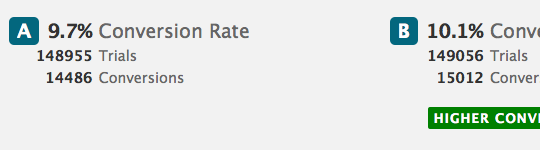
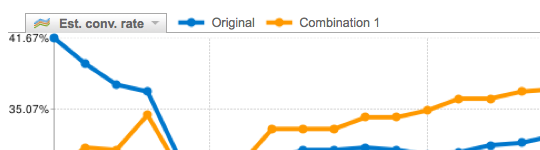
As a web designer it’s hard to get the user experience design right first time, you never know how users are going to use the site or how big a difference small iterations will make, so it’s important to test the user experience and try out different solutions. That’s where A/B testing comes in.

A/B testing

A/B testing involves showing different users different versions of a site and measuring how each version performs.

  • Design two (or more) versions
  • Randomly show users different versions
  • Track which version performs/converts better
  • Evaluate
  • Use the best version

Sounds complicated doesn’t it? Thanks to Google it’s not as hard as you think. Google has a Website Optimizer service that enables you to easily setup A/B tests and then analyze the results for you.

A/B testing in action

I recently setup a very simple test with Sharethrough changing the call to action text of two buttons and measuring conversion to the products page.

Some users seen these buttons… and others seen these (50/50 split)
ab2.jpg
ab1.jpg
A B 5% improvement

Version B showed a 5% improvement on conversions to version A, the original.

I must stress this is a very simple test I put together but it just goes to show that even the smallest text change can make a difference. I can now go onto setup more tests and experiment with button placement, language used etc. while measuring conversions to enquiries and conversions to user signups.

A/B testing resources

Before you get started with A/B testing, check out the following:

Carsonified: How to do A/B testing in Wordpress

picture-281

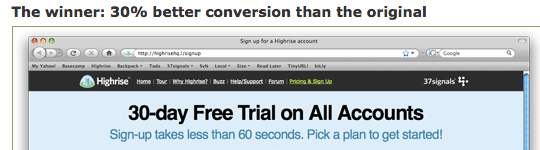
37 Signals: Writing Decisions: Headline tests on the Highrise signup page
picture-29

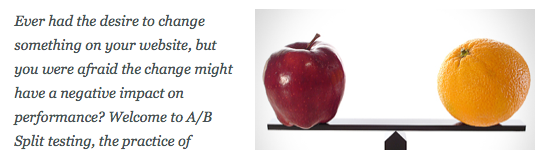
UX Booth: How to increase site performance through A/B split testing
picture-301

ABtests.com

picture-31

Google: Website Optimizer

picture-32

Do you use A/B testing?

Please share any experience or tips while doing A/B tests.

Freshbooks
Lee Munroe
About the author

Lee Munroe is a freelance web designer from Belfast Northern Ireland. Like this article? Feel free to follow Lee on Twitter.

Comments

Add a comment
  1. Gravatar

    Personally I only use A/B testing when I want to increase conversions on a site, because it gives you a very easy way to spot a winner. I’d also say that it’s only really useful if your site has a reasonable amount of traffic.

    For any experience testing, I think you need to really look at user testing because going by numbers on something such as experience is tricky unless you have a very clear set of goals you can compare against.

  2. Gravatar

    If you want to test different Wordpress themes (As opposed to different content) this is a great plugin that allows you to test multiple different themes and track the results through Google Analytics:

    http://wordpress.org/extend/plugins/wordpress-ab-theme-split-tests/

  3. Gravatar

    @Chris: That’s a really good point Chris. I guess I consider the conversion part of the UX, or at least the result of a good UX, which had an impact on my choice of wording for this post’s title. Be interesting to know if other designers consider conversions part of the UX? That said, of course user testing has a big hand in perfecting UX design, but wanted to highlight the awesome A/B tester that Google has in this post, for anyone who hasn’t heard of it yet.

    @Lee: Nice plugin - good way to break in a new design too
    http://wordpress.org/extend/plugins/wordpress-ab-theme-split-tests/

  4. Gravatar

    Good overview and I am a fan of A/B testing. But I think it’s dangerous using it in isolation without other data sources: http://www.elezea.com/2009/08/dangers-test-learn/

  5. Gravatar

    @Lee Totally agree that conversation is part of the whole UX, but I guess I generally see conversation as leading to some kind of conversion metric but I guess that could easily be something like improving the amount of people who post a status update as well as increasing sign ups.

    UX is such a broad term, but there is definitely a need for A/B testing :)

  6. Gravatar

    I probably don’t test things as much as I should, and I’d be the first to admit that. I’m mostly designing the visual interface and CSS stylesheets and then I pass things on to our developer to work with the nuts and bolts of the system. Interesting read though, and I can definitely see the advantage of doing so.

  7. Gravatar

    Totally agree with the post and I really appreciate your ideas!!

  8. Gravatar

    I wrote a post about how we use Google Optomiser a couple of months ago. Hope it’s of use to someone: http://www.boost.co.nz/blog/design/google-optimizer/

  9. Gravatar

    Hello Lee nice website you have. It shows how professional you are in the field of web design. :)

  10. Gravatar

    Great article, I recently started with A/B testing. I’ve been trying out the google website optimizer, only problem is that you need to add javascript to the target page. This is fine if you want to test on your own pages, but what about the next example: I have a blue “call to action” button for signing up on my rss, but how can I test this button (green version) if I can’t add javascript to the target page (which is the feedburner page)? Thanks!

  11. Gravatar

    I’ve used A/B split testing to increase the conversion on client’s websites. It’s very effective, I was about to go from 2% conversion to over 20% conversions using the methods over a 6 month period. Everyone should have some form of testing for websites.

  12. Gravatar

    It’s hard to say that user experience can ever be perfected. I am always looking at my web applications and seeing 3 or 4 things I can change or do differently to improve the way my users are interacting with my site - the only thing I need is more time to implement them.

Add a comment